

Want faster Wi-Fi at home without paying for a bigger plan? Most slow Wi-Fi problems happen inside the home, not on the internet line. Your broadband plan sets the maximum speed, but your router and how you use it decide how much of that speed reaches each phone, TV and laptop. These 10 steps fix the most common causes and improve Wi-Fi speed around the house.
1. Put the router in a central, open place
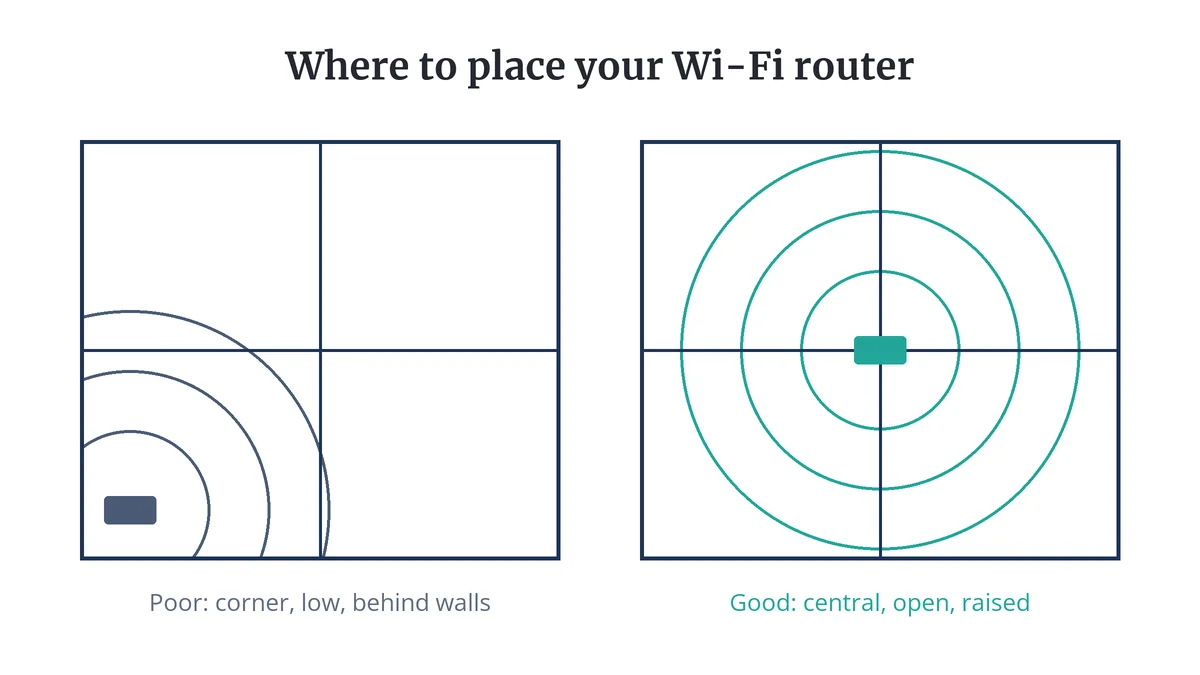
Wi-Fi signals weaken through walls, floors and metal. Place the router in the middle of your home, at table height or higher, and keep it out of cabinets and away from the back of the TV. This one change often does more for faster Wi-Fi at home than anything else on this list.
2. Use the 5 GHz band for nearby devices
Dual-band routers broadcast two networks: 2.4 GHz has longer range but lower speed, while 5 GHz is much faster over shorter distances. Connect TVs, laptops and phones in the same or next room to the 5 GHz network for faster Wi-Fi at home.
3. Restart the router regularly
Restarting clears temporary glitches and memory build-up. Switch the router off for 30 seconds and back on, once every week or two.
4. Keep the router firmware updated
Manufacturers release updates that fix bugs, close security holes and sometimes improve speed. Check the router’s app or settings page for updates.
5. Use a strong Wi-Fi password
An open or weak password lets neighbours use your connection and slow it down. Use WPA2 or, if your router supports it, WPA3 security with a long password. The Wi-Fi Alliance explains Wi-Fi security standards in more detail.
6. Connect fixed devices with a cable
Smart TVs, desktop computers and gaming consoles near the router work best on an Ethernet cable. A wired connection is more stable and leaves more Wi-Fi capacity for phones and laptops.
7. Add mesh Wi-Fi for large homes
In multi-storey homes or houses with thick walls, one router rarely covers every room. A mesh Wi-Fi system uses two or three units to spread a strong signal across all floors, which is better than a basic range extender.
8. Change the Wi-Fi channel
If many neighbouring networks are nearby, they can interfere with yours. Set the router’s channel to automatic, or choose a less crowded channel in the router settings.
9. Check what is using your bandwidth
Large downloads, cloud backups, game updates and automatic phone updates can use most of your connection. Schedule them for late at night so evenings stay fast for streaming and calls.
10. Make sure your plan fits your home
If you have tried every step and things are still slow when everyone is online, your home may simply need more speed. Our guide on how much internet speed you need helps you decide, and you can compare Airmax Broadband fiber plans from 50 to 400 Mbps. If fiber is not available at your address, see our wireless broadband plans.
Frequently asked questions
Why is my Wi-Fi slow in some rooms?
Walls, floors and distance weaken Wi-Fi signals. Moving the router to a central, raised spot or adding a mesh system usually fixes weak rooms.
Should I use 2.4 GHz or 5 GHz Wi-Fi?
Use 5 GHz for devices in the same or next room; it is much faster. Use 2.4 GHz only for devices far from the router, where range matters more than speed.
How often should I restart my router?
Restarting once every week or two clears temporary glitches. If you need to restart it every day, contact your provider or consider a newer router.
Does Airmax Broadband provide a router?
Customers use their own Wi-Fi router. The Airmax Broadband team can recommend a suitable dual-band or mesh router for your home.
Get faster Wi-Fi at home with Airmax Broadband
Airmax Broadband customers can call or WhatsApp our Karnal support team on 905 379 1719, 9:30 am to 6 pm, all 7 days. We can also recommend a suitable router for your home. New to Airmax Broadband? Find out whether fiber or wireless broadband suits you best.